
Before you enroll, check the directory’s identity and current status, your eligibility, its coverage, and the participation terms. These checks help you decide whether the listing suits your business.
A directory listing is useful only if it reaches people who may need your business. Compare its categories, locations, and listing requirements with the customers you want to reach.
This article explains what to check before submitting a directory listing, including its current status and enrollment terms, so you can make an informed decision.
Key Takeaways
- Check who maintains the directory and how current listing and credential information is verified.
- Compare eligibility rules, categories, and geographic coverage with your business details and service area.
- Clarify what enrollment requires and how participation terms affect your listing over time.
- Review the audience and lead data available, then consider whether Domain Listings Directory’s location and category browsing fits your listing goals.
Credential verification and current status
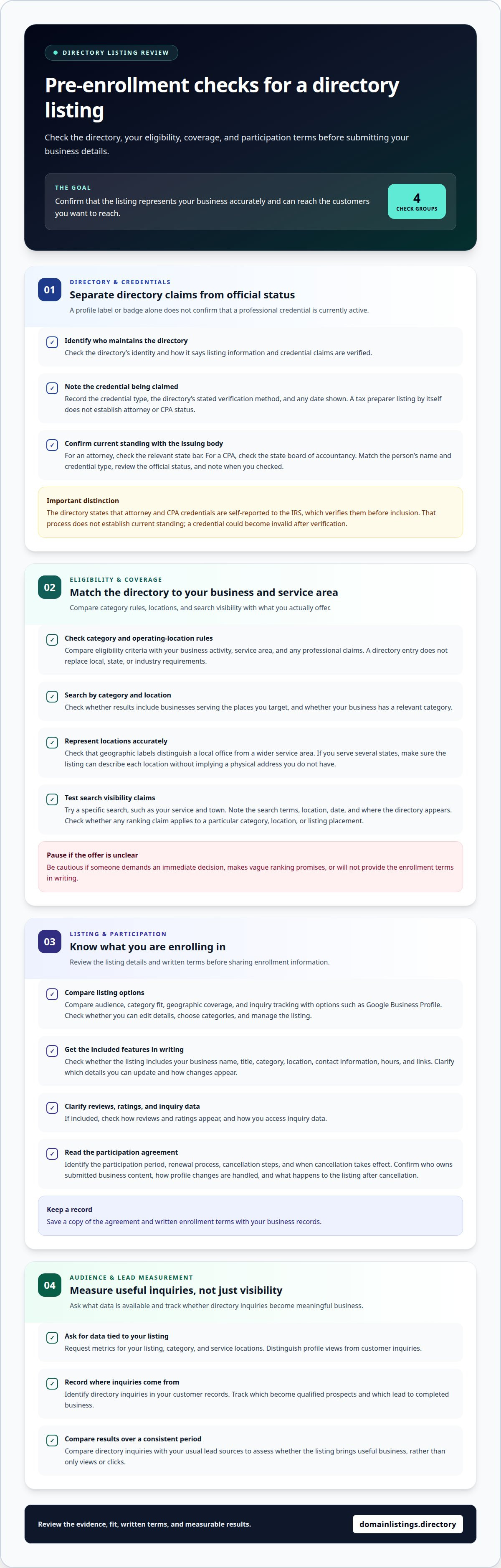
Check the directory’s credential claims separately from whether a credential is currently valid. For attorney or CPA listings, compare the directory’s statements with the current record held by the relevant issuing body.
-
Verify Credentials
Review how the directory says it verifies professional credentials. The directory states that attorney and CPA credentials are self-reported to the IRS, which verifies them before inclusion. That process does not establish current standing: a credential could become invalid after verification. Note the credential type, stated verification method, and any date shown. Do not treat a badge or profile label as proof of an active credential.
-
Confirm Current Status
Check a professional’s status with the credential’s issuing body, not just the directory. For an attorney, consult the relevant state bar; for a CPA, consult the state board of accountancy. Match the person’s name and credential type, then review the status shown in the official record. Note the date of your check, and record any differences between the official record and the directory.
- Separate directory claims from official records. In the United States, anyone with a Preparer Tax Identification Number (PTIN) can prepare a tax return for a client. A tax preparer listing alone does not establish attorney or CPA status. Check which qualification the profile actually claims. For a motor vehicles business, assess credential claims separately from the directory entry. Use that distinction when deciding whether the listing supports your enrollment decision.
Use the issuing body’s record to assess whether a credential is current. For an attorney, consult the relevant state bar; for a CPA, consult the state board of accountancy. Use the directory to identify the credential being claimed, then verify that claim with the body responsible for issuing it. A directory entry alone cannot settle a question about official status. If the issuing body’s information differs from the directory’s description, keep the claims distinct and base your assessment of current standing on the issuing body’s record. This helps prevent a profile label from being mistaken for confirmation by the authority that issued the credential.
Directory eligibility and coverage
Check eligibility, geographic reach, and how the directory describes search visibility before enrolling. Local, state, or industry requirements may also apply to your business listing.
-
Review Rules and Requirements
Check the rules that apply to your business category and operating locations. A directory entry does not replace local, state, or industry requirements. For example, a motor vehicle business serving drivers across several states should review how the listing describes its locations and services. Compare the directory’s eligibility criteria with your business activity, service area, and any professional claims. Avoid categories that imply you offer services you do not provide.
-
Check Search Visibility Claims
Test visibility claims with a specific search, such as your service and town. Note the search terms, location, date, and where the directory appears. Compare the results with any ranking claim, checking whether it applies to a particular category, location, or listing placement. Search results vary, so distinguish broad visibility promises from results stated for a defined query.
- Match coverage to your service area. Search by category and location, then check whether results include businesses serving the places you target. Make sure your business type has a relevant category and that geographic labels distinguish a local office from a wider service area. If the directory covers several states, check that your listing can represent each location accurately without suggesting you have a physical address where you do not.
- Recognize pressure tactics. Pause if a salesperson demands an immediate decision, makes vague ranking promises, or will not provide the enrollment terms in writing. Review the directory’s identity and listing details before sharing business information. You should be able to understand the offer and decide without pressure.
- Plan lead measurement. Record inquiries from the directory and identify their source in your customer records. Track which inquiries become qualified prospects and which lead to completed business. Compare these results over a consistent period with your usual lead sources. This helps show whether the listing brings useful business, rather than just views or clicks.
Enrollment Terms and Participation
Review enrollment requirements, listing features, and participation terms before joining. Check how a listing will be created, maintained, and closed.
-
Compare Listing Options
Compare a directory with Google Business Profile and other options by audience, category fit, geographic coverage, and inquiry tracking. Choose a listing option that gives relevant customers a useful way to find your business. Check whether you can edit details, choose categories, and manage the listing. Avoid similar listings without a clear distinction.
-
Assess What the Listing Includes
Ask for a written description of the listing’s contents and features. Check whether it includes your business name, listing title, category, location, contact information, hours, and links. Confirm which details you can update and whether changes appear in the online listing. If reviews, ratings, or inquiry data are included, clarify how they appear and how you access them. Use these details to assess the listing.
-
Review Participation Terms
Read the agreement before submitting enrollment details. Identify the participation period, renewal process, cancellation steps, and when cancellation takes effect. Confirm who owns the business content you submit, how profile changes are handled, and what happens to the listing after cancellation. Keep a copy of the agreement and written enrollment terms with your business records.
What traffic, audience, and lead data should I ask a directory for?
Request metrics for your listing, category, and service locations. For example, distinguish profile views from customer inquiries, since visibility alone does not show whether a listing generates prospects.
- Ask for listing-level activity. Request views or appearances for your individual profile, not just total directory traffic. Ask how each metric is defined and what period it covers. Check whether reports separate searches by category and location. Directory-wide audience figures may include people looking for businesses unlike yours, so they do not show your listing’s specific reach.
- Check audience relevance. Ask which audience details the directory can report, such as search location, category, or device type. Focus on information that helps you assess whether visitors could use your business. For example, a local repair company may find nearby service searches more relevant than traffic from distant areas. A large audience does not necessarily mean relevant demand.
- Separate engagement from leads. Ask whether reports distinguish profile views, contact-detail clicks, calls, and submitted inquiries. These actions indicate different levels of intent. A phone-number click does not show that a call connected or became a business inquiry. Request clear definitions for each reported action and how it is attributed to your listing.
- Set up your own lead record. Record each inquiry’s source in your customer tracking system, then note whether it was relevant and progressed to a sale. Compare your records with the directory’s reported activity. For example, profile views without directory-sourced inquiries in your records mean visibility has not translated into measurable leads. Use the same definitions for each review.
A lender should send a lien release within 30 days where borrowers must file for title. Notify the car insurance company after receipt so the lienholder can be removed from the policy; keep the title secure, not in the vehicle.
Pennsylvania ELT participants contract with a PennDOT-approved service provider, not directly with PennDOT, to transmit vehicle and title data. After loan payoff, Illinois title and registration applicants remove lien holder information from the Lien Information section; Illinois owners keep the title secure, not in the vehicle.
Domain Listings: Domain Listings Directory
Domain Listings Directory gives your business a place in an online directory where people can search by location or category. Consider a business listing if you want potential customers to find, review, and compare businesses using these browsing options.
- Review how users browse. The directory offers “Browse Top Listings” and “Browse by Category,” as well as location and category searches. Consider whether these paths match how customers look for your type of business. Location searches may suit businesses serving a defined area, while category browsing groups businesses by type. This structure can help you assess whether the directory fits your listing goals.
- Consider the information displayed. Listings can show business hours, contact information, social media, user reviews, and ratings. Initial listing pages are generated using publicly available business information. Review whether those details accurately represent your business and give customers what they need to assess it. Reviews and ratings are user content, so treat them as visitor feedback, not a promise of any particular response.
- Use the available business data. Businesses receive direct access to analytical data. Use it to understand activity associated with your listing, then compare it with the inquiries your business records. Domain Listings Directory lets users browse by location or category and review business information. Consider whether these tools and the listing format suit the audience you want to reach.
If location and category browsing fits your intended audience, Domain Listings Directory may be a suitable next step for your business listing. Review the directory’s information and enrollment terms against your requirements before proceeding. To discuss a business listing, contact Domain Listings when convenient.
Frequently Asked Questions
How can I verify a business directory is reputable before paying?
Check that the directory identifies its operator and provides consistent business and support details. Search for your business name, then review whether similar listings have complete, consistent profiles. Read the directory’s privacy and listing policies to understand how it handles submitted information. If contact details differ across the directory’s own pages, resolve that inconsistency before enrolling.
What information should I prepare before submitting a directory listing?
Prepare one approved set of business details and decide who can authorize changes. Confirm your business name’s spelling, the locations you want represented, and the contact details customers should use. Keep the approved information in a shared business record so the person completing the listing can enter it consistently and your team can refer to the same version later.
Are directory listing fees one-time, monthly, or annual, and do they auto-renew?
Billing frequency and automatic renewal depend on the directory’s enrollment terms. Before agreeing, check whether payment is one-time or recurring, how renewal is communicated, and what action stops the next billing cycle. Note the cancellation deadline and keep confirmation after submitting a cancellation. Also check whether the directory can change participation terms before renewal and how it gives notice.
What are common directory listing scams and high-pressure sales tactics?
Be cautious if a salesperson demands an immediate decision, makes vague ranking promises, or will not provide enrollment terms in writing. Independently check the directory’s identity and listing details before sharing business information.


