
An online business directory listing is a searchable profile that helps people find local businesses by location or category and review details such as contact information, operating hours, and customer ratings. Directories vary in the information they display, so a listing is most useful when it presents the business clearly and makes it easy for people to get in touch.
This guide explains how business directories work, what to include in a profile, and how to choose a listing option that suits your business. A directory can help people discover and compare businesses, but it cannot guarantee customer inquiries. Clear, accurate details and relevant categories make it easier for people to browse and understand what you offer.
Key Takeaways
- Learn what to expect from directory submission and editorial review before selecting a listing option.
- Assess how local listings can support business discovery and what to consider when choosing directories.
- Understand how directories organize businesses by category, location, activity, or size.
- Identify the profile and contact details that help people recognize your business and connect with you.
What local business listings include
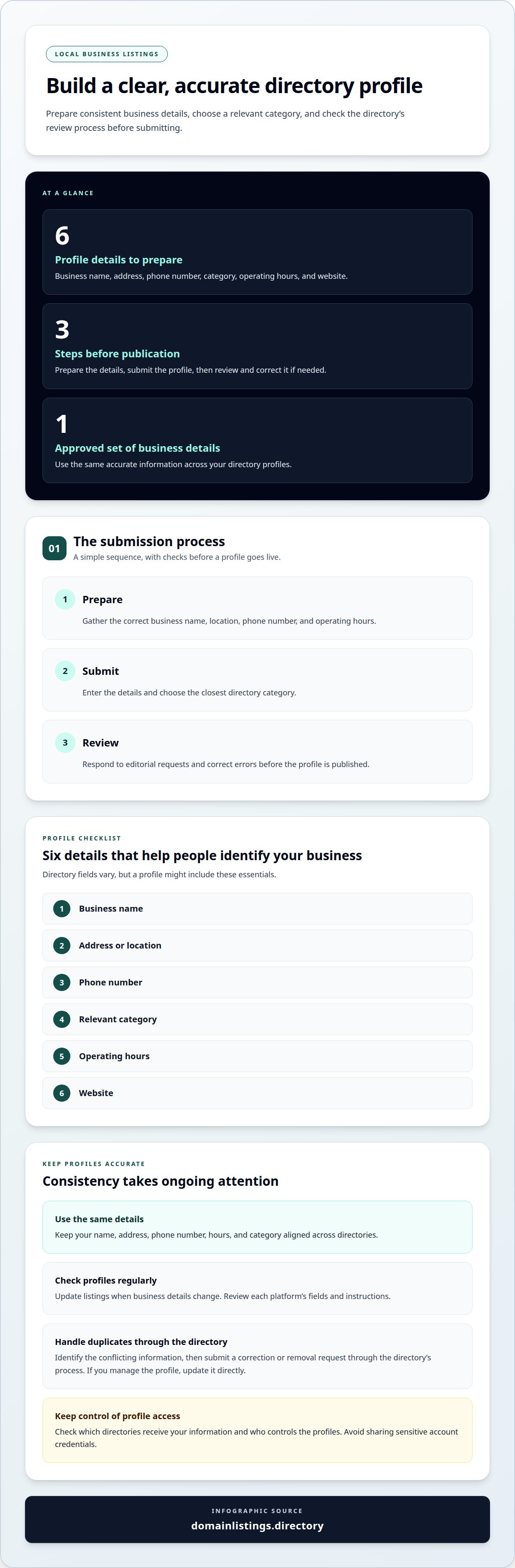
Local directories may offer a basic business profile, but access and review processes vary by platform. Before submitting an online business directory listing, identify the directory’s required fields and whether it reviews entries before publication. A profile might include a business name, address, phone number, category, hours, and website. Keep these details consistent so customers can recognize the same business across local search results.
Submitting a profile typically means entering business details, choosing a relevant category, and completing any requested accuracy checks. A directory may review an entry against its rules and ask for corrections if, for example, an address is incomplete or the category does not match the business.
- Prepare: Gather the correct business name, location, phone number, and operating hours.
- Submit: Enter the details and choose the closest directory category.
- Review: Respond to editorial requests and correct errors before the profile is published.
Yelp is one example of a directory profile that includes customer reviews, which can influence how people perceive a business. Monitor feedback, respond professionally, and correct factual errors through the platform’s available processes. The Yellow Pages and other directories may use different profile fields and review procedures, so read each platform’s instructions before submitting.
Keep listings accurate by maintaining one approved set of business details, then using the same name, address, phone number, hours, and category across directories. Review profiles regularly so you can update them when details change.
To correct or remove a duplicate listing, identify the directory and the conflicting information, then submit a correction or removal request through its process. If you have access to manage the profile, update it directly.
Check that any directory service explains which directories receive your information, what the listing includes, and who controls the profiles. Avoid sharing sensitive account credentials, and keep access to your listings. Customer reviews and feedback are managed through each directory, not guaranteed by a listing service.
Benefits of online business directories
A profile gives a local business another place to be found and reviewed. Its usefulness depends on the platform’s audience, categories, and profile features.
Directory Platforms
Directory platforms provide a place to display business details, while available fields and review processes vary. Compare the audience, category options, contact fields, and profile controls before choosing where to be listed. For U.S. businesses, Google Business Profile, Google Maps, and Yelp are familiar options to consider; the best fit depends on where customers look and which profile features suit the business.
Check whether a platform supports useful contact links, such as a phone number, website, or social profile. Choose a category that accurately describes the business, rather than a broad or incorrect classification.
Listing Benefits
A directory listing can extend a business’s presence beyond its own website. Someone comparing nearby repair shops, for example, may find a profile through a directory’s category or location search. Reviews and contact details can help that person assess the business and decide what to do next.
Consistent profiles also help you manage your online reputation. Respond to feedback where the platform allows, correct outdated details, and keep business information aligned. A complete profile can help people assess the business, but it does not guarantee inquiries or sales.
Local SEO and Search Rankings
Directory entries help customers find consistent business information. Google’s local results are determined by distance, relevance, and prominence. Accurate categories and location details support relevance, while reviews and mentions can contribute to prominence. A directory listing alone does not guarantee a higher position in local search or Google Maps.
Prioritize directories that fit the business, then keep profile details consistent and respond to feedback. A professional listing option can help organize business information for directory placement. Explore business directory listings as a next step.
What is a Business Directory?
A business directory groups profiles by service, location, or activity. In the United States, prioritize directories that match your industry, service area, and the way customers search. Google Maps and professional-service directories illustrate how digital platforms connect potential customers with relevant businesses.
Directory Categories and Regional Coverage
Directories group businesses under categories such as legal services, plumbing, restaurants, or healthcare. Location filters may sort results by city, county, state, or service region. Global directories support broader discovery, while regional directories can focus on nearby service areas. Choose categories and locations that accurately describe your business.
Business categorization developed alongside printed directories. The concept of classifying businesses by category emerged in the 1880s. In 1883, a printer in Cheyenne, Wyoming, used yellow paper to distinguish business listings visually. Reuben H. Donnelley established the first official Yellow Pages in Chicago in 1886. These examples show how color, category, and place helped readers locate entries.
Industry and Location Relevance
The right directory depends on your industry and geography, so no single platform suits every U.S. business. A local restaurant may need dining categories tied to its neighborhood, while an accountant may need a professional-services category. A contractor serving several towns benefits from location information that reflects that coverage, rather than a profile limited to one city.
Before choosing a directory, review its audience, category structure, and regional reach. A retailer with one storefront should have a profile tied to its actual location. A service business covering multiple counties needs categories and location information that explain its coverage accurately. Clear classification helps people distinguish a nearby provider from a business serving a wider area.
Assess a directory’s fit by checking its industry categories, the locations covered by its searches, and the details shown on each profile. A digital directory with relevant categories and location filters can make business information easier to find. The best fit is one whose structure reflects how customers look for that service.
Business profile details and contact information
A useful business profile gives people the details they need to identify and contact the business. Since directory fields vary, review the available options before submitting information.
Business Profile Information
Start with the business name, address or service area, phone number, website, and operating hours. These details help people recognize the business and decide how to get in touch. A shop with a public storefront should show its location, while a mobile service should clearly describe its coverage area.
Write a concise description that explains the main service without turning the profile into a general advertisement. Choose a category that matches the actual work, then check every field for accuracy before submitting.
Listing Profile Features
Some directories display customer reviews, ratings, business hours, contact information, and social media links. Others offer fewer profile fields. Review the published page layout and note which details appear prominently, such as the phone number or website link.
Use the available features to make the next step clear for customers. Someone viewing a restaurant profile may need its hours and phone number, while a professional-service profile may need a service description and contact method. Prioritize the details that help people understand the business and get in touch.
Consistent profiles reduce conflicting information across directory pages. If the address changes, update any profile showing the old location. If hours vary by season, use the directory’s hours feature to show the current schedule rather than mentioning it only in the description.
Check how the directory displays your details. Review the published entry for missing text, broken contact links, or a category that misrepresents the business. Where available, analytical data can show how people interact with a profile, including which contact details they use.
For a directory placement option, submit your business profile with accurate business and contact details.
Domain Listings: Business listings
Domain Listings, LLC provides business listings through the Domain Listings Directory, where people can search by location or category and review business profiles. This can suit you if you want your business details presented in a directory that supports browsing and comparison.
Profiles can display business hours, contact details, social media, and user reviews and ratings. Initial listing pages are generated using publicly available business information, and businesses receive direct access to analytical data. Review the profile and provide accurate details so the listing represents your business clearly.
If a directory listing is a practical next step for your business, contact Domain Listings, LLC to discuss a listing in its directory.
Set a Clear Direction for Your Listing
Decide what you want an online business directory listing to help people do. You might want them to find a storefront, understand a service area, or contact your team easily. Defining that goal helps you choose a directory placement that suits how customers find and assess your business.
Domain Listings, LLC offers business listings in its directory. People can search by location or category and review business profiles, making the directory an option for businesses seeking another way to be discovered. Consider whether this kind of directory fits how you want potential customers to find your business.
When you’re ready to discuss a listing, contact Domain Listings, LLC about your business listing. A clear purpose gives the conversation a useful starting point, so you can take the next step with confidence.
Frequently Asked Questions
How do I find a list of local businesses?
Start with a city or county chamber of commerce directory, then search a map-based directory for businesses serving the same area. Use the service and place name as search terms, and compare results with each business’s current public contact channels. If you’re compiling a list, record each business name and where you found it so you can trace updates later.
What is an online business directory listing?
A directory listing is a profile associated with a business, separate from the business’s own website. People may find it while browsing or comparing businesses. For example, a directory may group a business under a service category, while the business website provides more detail. Treat the listing as one point of discovery, not a replacement for other online information.
What information should I include in a business directory listing?
Include details that distinguish the business from similarly named listings, such as a branch label, suite identifier, or appointment process. If the directory has a description field, state the main service and relevant limits in plain language. Keep internal notes and personal information out of public fields unless they are intended for customers. This helps direct inquiries to the right place.
How do I review an online business directory listing?
Listing rules and features vary by platform. Read the applicable terms to understand what the profile includes, how edits are handled, and who can manage it after publication. Identify the process for correcting details such as an outdated category. Understanding these steps helps you assess whether the directory fits your business workflow before submitting information.
How can I tell whether a business directory listing is useful?
Ask new customers how they found your business and note when they mention a directory. Compare the pattern with inquiry quality, including whether requests match your services and coverage. If people arrive with incorrect expectations, revise the category or description. This helps you judge a listing by the relevance of the inquiries it brings, not simply by whether a profile exists.


