
Finding a local business starts with matching what you need to where you need it. Local business listing sites organize businesses by location or category, making that search easier. Listings can bring together contact details, hours, reviews, and ratings so you can assess options beyond a business name alone.
This guide explains how directory listings work and how location, categories, and profile details help people discover and compare local businesses. You’ll also learn how listings relate to local search and map results, and what to consider when choosing directories for a business listing.
Key Takeaways
- Compare directory examples by their purpose and estimated domain authority, but treat authority as one factor when assessing a listing site.
- Prepare accurate business details, photos, reviews, and categories so listings give people useful information to assess.
- Prioritize directories that are relevant to your business instead of submitting your details everywhere.
- Use location and category browsing to narrow options and find businesses that match what you need.
What are Online Local Business Directories?
An online directory groups business profiles by location, category, or industry. These listings help people find nearby services and compare key details across businesses.
Directory Examples and Domain Authority
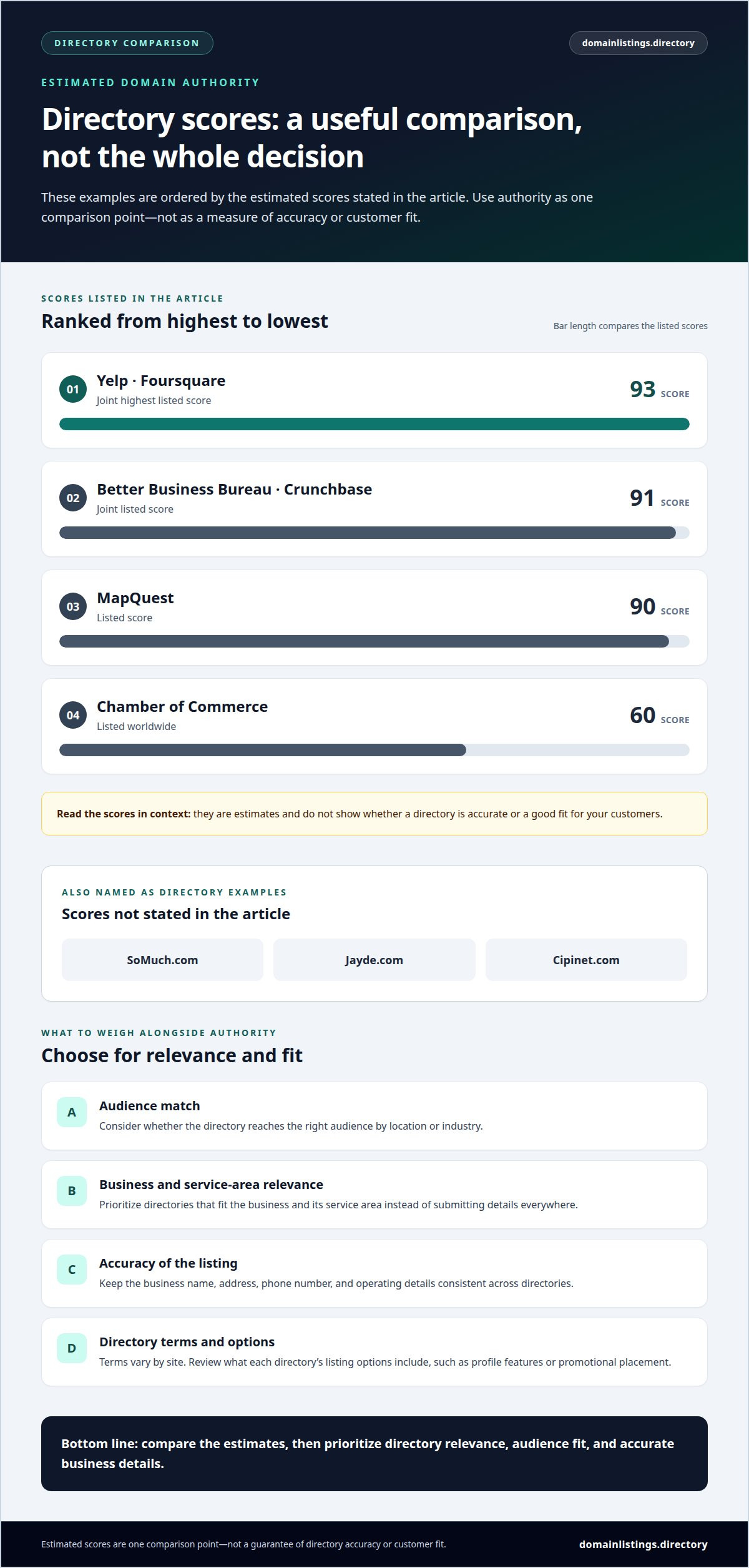
Examples include Yelp, Foursquare, the Better Business Bureau, Crunchbase, and MapQuest. Estimated domain authority scores are 93 for Yelp and Foursquare, 91 for the Better Business Bureau and Crunchbase, and 90 for MapQuest. Chamber of Commerce is listed worldwide at 60. Other examples include SoMuch.com, Jayde.com, and Cipinet.com. Treat these estimates as one comparison point, not as a measure of directory accuracy or customer fit.
Local SEO and Search Presence
A directory profile gives search engines another source of business information and can support a business’s local search presence. Google’s local results consider distance, relevance, and prominence. A listing can help people discover a business, but its category and location still need to match the search. Choose directories relevant to the business and its service area rather than trying to appear on every site.
Consistent Business Information
Keep the business name, address, phone number, and operating details consistent across directories. If one profile shows an old phone number or a different address format, people may struggle to identify the right listing. Review profiles when details change, then update each directory that displays them. Consistent information makes listings easier to recognize and supports a clear presence across search engines.
Directory Terms
Directory terms vary: some sites accept basic business submissions, while others offer different listing options. Review each directory’s terms and what its options include, such as profile features or promotional placement. Don’t assume every directory works the same way. The key question is whether the site reaches the right audience by location or industry.
How do business directory listings work?
A directory profile brings business information together on a platform where people can review their options. Its fields connect a business name and services with relevant searches.
Business Listing Information
A profile commonly includes the business name, address, phone number, photos, reviews, and categories. Each field has a practical purpose: categories describe the service, while contact details help people reach the business. Keep information consistent across profiles. A clear, current entry helps people distinguish the business from similar listings and decide whether it meets their needs.
Platforms may review submitted information before displaying or updating a profile. Their processes and listing criteria vary, so read each platform’s instructions. Check the details before submitting, especially the address and category, which affect how people interpret the listing.
Review policies, duplicate-listing rules, and requirements for service-area businesses vary by platform. Follow the platform’s published rules, provide accurate business details, and avoid duplicate profiles where its policies prohibit them.
Customer Reviews and Trust
Reviews give people an account of previous customer experiences, while ratings provide a quick summary of feedback. Community platforms can collect these opinions alongside contact details and business hours. Read individual comments as well as the overall rating; a review’s specific context may help you assess whether the service matches your needs.
Recent reviews can show how customers describe their experiences over time, but they don’t replace checking practical details such as services and operating hours. Businesses can respond on platforms with review-response features. Keep responses professional and focused on the issue raised, without sharing private customer information.
For another way to browse categorized business profiles, use the business directory.
Visibility in local search and map results
Directory profiles can help people find businesses through local search and map services. Visibility depends on how well a business matches the search and the searcher’s location.
Google Business Profile, Yelp, Bing Places, and Apple Business Connect support different discovery platforms. Google Business Profile connects business information with Google Search and Maps, while Yelp focuses on directory profiles and reviews. Bing Places supports business details in Bing search and maps, and Apple Business Connect manages information shown across Apple services, including Maps.
Google considers distance, relevance, and prominence in local search rankings. Distance reflects how far a business is from the searcher; relevance concerns how closely the profile matches the search. Prominence relates to how well-known a business appears. A directory listing can provide useful context, but it cannot control where Google places a result.
Searches often combine a service with a place, such as “plumber near me” or “bakery in Denver.” Categories help platforms interpret what a business offers, while location details help match it with nearby searches. Choose accurate categories and describe services clearly. A broad or mismatched category may make the profile less relevant to a specific service search.
For a clear digital presence, submit accurate profile details to platforms that fit your audience. Review each profile for correct contact information, categories, and service details. Update listings when business information changes so customers don’t encounter conflicting records. Prioritize directory quality and relevance over submitting to every available site.
Maps and search platforms display information in different ways. Someone using Google Maps may look for nearby options and directions, while a Yelp user may compare business profiles and customer feedback. Keep core details consistent across platforms, then check how each profile appears to people searching for your service and location.
Finding local businesses by category or location
A directory search usually begins with a service category, a location, or both. For example, selecting “plumbing” and entering “Austin” narrows a broad directory to listed businesses matching that service and place.
Start with the category if you know what service you need but not which business provides it. Then add a city, neighborhood, or other location term to find nearby options. If the results are too broad, choose a more specific category or refine the location. A directory that groups entries by category and place makes it easy to narrow the list.
For each result, compare details that help establish whether it fits your request:
- Check that the business name and location match your intended area.
- Review categories and service descriptions for relevance to your need.
- Use hours, contact details, ratings, and customer reviews to compare profiles.
These checks help distinguish a relevant listing from one that shares only a broad category. For example, a directory may list several home-service businesses, but their profiles may describe different specialties or service areas. Read profile details before contacting a business. Accurate information helps you assess the result; a category label alone doesn’t explain every service or location served.
Search results can differ between a directory and Google Business Profile because each platform organizes and displays listings in its own way. Treat directory categories as a starting point, then compare the available profile details. A listing’s position or authority score doesn’t by itself show whether the business suits your specific request.
For business owners, clear categories and location details help people interpret where a listing may appear relevant. Browse businesses by category or location to see how directory profiles support discovery.
Domain Listings: Business listings
Domain Listings, LLC helps people discover local businesses through its Domain Listings Directory, where you can browse by location or category. Businesses have a profile that customers can review and use to connect with them.
Listings display details such as business hours, contact information, social media links, user reviews, and ratings. Browse by location or category to find listings, then review the available details to compare businesses. You can use the listed contact information or social media links to connect with a business.
Use the directory to browse listings and compare businesses by location or category. If you want to discuss a business listing, contact Domain Listings, LLC.
Set a Clear Direction for Your Next Listing
Choose local business listing sites based on the customers you want to reach and the information they use to decide where to go. A focused approach makes it easier to maintain your directory presence as business details or customer needs change.
Before adding another profile, identify what you want people to do after finding your business: call, visit, or review more details. That goal can guide which directories deserve attention. Domain Listings helps businesses connect directory listings with customer discovery through its business directory.
Domain Listings offers business listings through the Domain Listings Directory. If you’re ready to discuss a listing, contact Domain Listings. Take the next step when it fits your business priorities.
Frequently Asked Questions
What are the best local business listing sites in the United States?
The right options depend on how customers in your field discover businesses. If your business relies on map searches, prioritize platforms with map-based discovery; if customers compare feedback, consider directories with review features. Yelp, Google Business Profile, Bing Places, and Apple Business Connect serve different discovery contexts. Choose sites based on audience and relevance, not name recognition alone.
How do I create and verify a local business listing?
Find the platform’s business submission or claim process, enter the requested details, and follow its verification instructions. Use an email address or phone number your business can access, since the platform may use those channels during setup. After verification, review how the profile appears and correct any errors. Each platform sets its own submission and verification steps.
What information should a business include in directory listings?
Include enough detail for people to identify the right business and decide what to do next. For example, a repair company should specify its services rather than rely on a broad label. Add current hours and a working website where those fields are available. Use clear photos that accurately represent the business, and choose categories that describe its actual work.
How can I keep business listings consistent across multiple sites?
Keep a central record of approved business details, including the exact public name, address format, phone number, hours, and service descriptions. When something changes, update that record first, then use it to revise each active profile. A directory-by-directory log can show which profiles are up to date and which need attention, reducing accidental inconsistencies during later edits.
Which listing sites are best for specific industries and professions?
Choose directories based on how customers search for the service, not just the industry label. Someone looking for a lawyer may value professional categories and location filters, while someone choosing a restaurant may focus on menus, hours, and customer feedback. Review each platform’s categories and profile fields, then prioritize those that help customers assess your services clearly.
How do local business listings affect local SEO and search rankings?
Listings can help people find a business across directories, maps, and search platforms, but a profile alone does not guarantee a higher search position. Its usefulness depends on how relevant it is to the search and the quality of its information. Treat directory profiles as one part of your online presence, helping people identify and evaluate the business.


