
To list a local business online, add accurate business details to relevant directories so customers can find it beyond its own website. These profiles support local discovery by showing useful information such as location, opening hours, contact details, and business categories.
Verification is a separate platform step. It may require someone authorized to manage the business to confirm their connection to a listing, and the process varies by directory.
This guide explains what local directories do, how listings support online visibility and local SEO, what information to include, and what to expect during verification.
Key Takeaways
- Use relevant local directories to make your business information available beyond your own website.
- Keep core details consistent across listings so customers can identify and contact your business.
- Treat directory profiles as part of local promotion, with useful details that help people decide whether to visit or get in touch.
- Learn what business-page verification may involve and how Domain Listings can help people discover businesses through its directory.
What are Online Local Business Directories?
An online local business directory is a third-party resource where people can find business details. A listing may appear in a directory, map service, or social media platform. For example, a customer might search for a nearby shop, check its hours, and view photos before visiting.
Owners wondering how to list a local business online need more than a single profile. Start with a reference record containing the business name, address or service area, phone number, website, hours, and category. Use it to keep details consistent across directories. When hours change, update each active listing and record which profiles you amended.
To list a local business online, first gather the information needed for a useful profile: the official business name, location or service area, contact details, operating hours, and a clear description of the products or services. Add suitable photos, such as a storefront or product display, and make sure each image represents the business accurately.
For a U.S. business, relevant platforms may include Yelp, Bing Places, and Apple Business Connect, depending on the business type and audience. Enter approved details through each platform’s listing process, select relevant categories, add available photos, and submit the profile for any requested verification. Steps vary by platform.
Reviews require a separate response process. A professional can organize feedback by listing, alert the business to new comments, and help prepare clear, respectful replies that address each customer’s point. For example, a response to feedback about opening hours can clarify the schedule without sharing private customer information. This helps the business engage consistently across its profiles.
Listings appear on sites other than a business’s own website. Include address, hours, product brands sold, and directions; restaurant listings can include food type, menu, and reservations; clothing shops can list specialties and parking recommendations. 54% of smartphone shoppers and 42% of desktop or tablet shoppers look for hours.
Business advertising and local promotion
A directory listing supports local promotion by placing business information where nearby customers browse. A search may surface a profile when someone looks for a service in their neighborhood. The listing helps people assess whether the location, service, and hours suit their needs. It supports discovery, but does not replace accurate advertising or a clear offer.
A professional can explain how to list a local business online by distinguishing a directory profile from paid advertising placement. Before arranging promotion, they clarify what placement covers, how long it runs, and who controls the account. Written service details help the business understand which directories will be updated and what work is included.
Promotional content works best when it matches what local customers can expect. A bakery might describe its specialties; a repair shop might name the work it handles. Use plain language, describe the actual business, and direct readers to a current contact channel. Photos can help customers recognize a storefront or understand a product before visiting.
When deciding how to list a local business online, review paid listing services carefully. Pressure to decide immediately, vague deliverables, requests for account passwords, and promises of guaranteed placement are warning signs. Keep control of business profiles and get the work scope in writing before authorizing changes. A directory placement cannot guarantee leads, rankings, or sales.
After listing a business, keep promotional details aligned with its real operations. Update profile information when services or hours change, and respond to customer feedback with specific, courteous replies. This keeps the listing useful without creating expectations the business cannot meet.
Business-page verification requirements
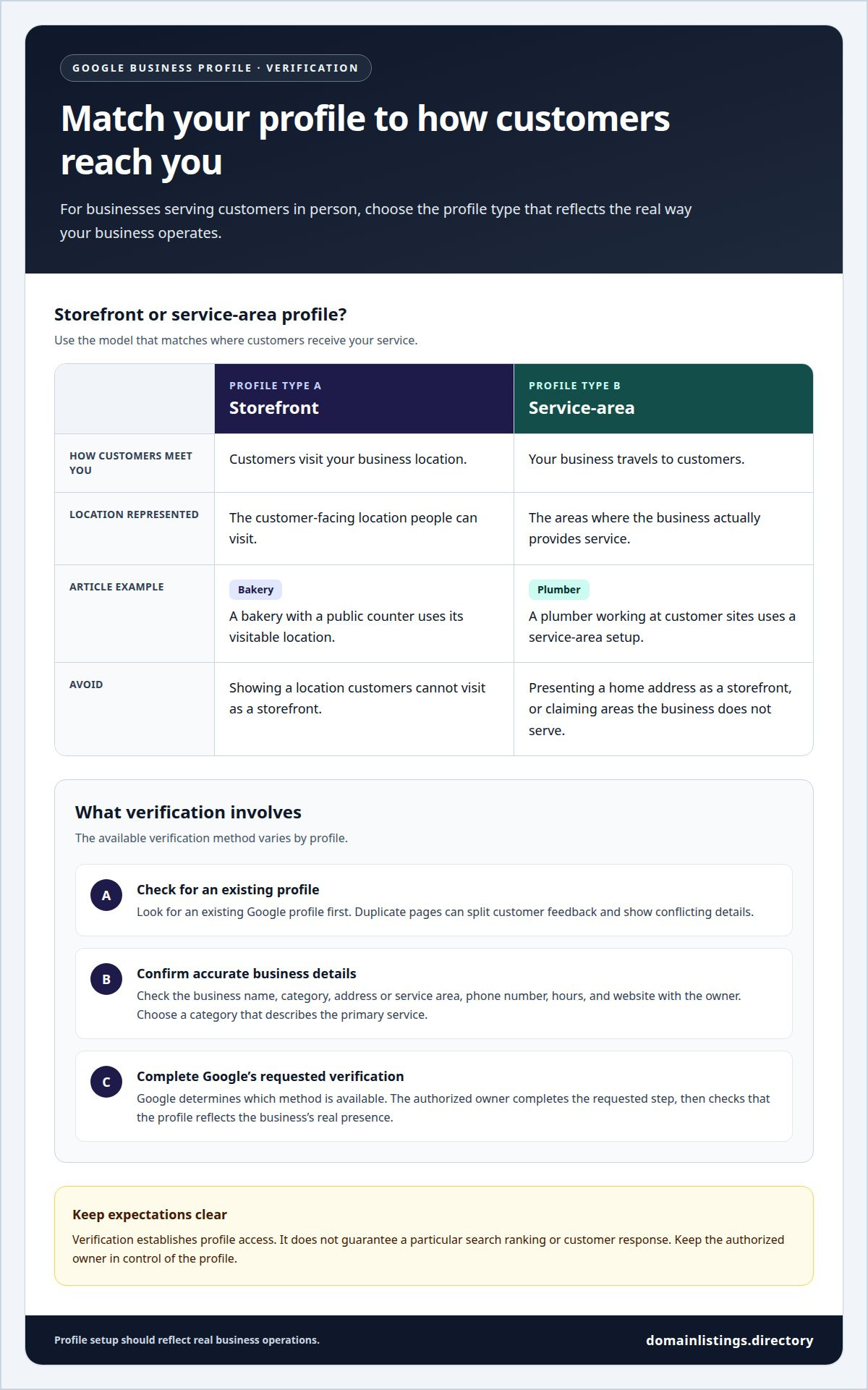
Verification connects a business profile with someone authorized to manage it. For Google Business Profile, eligibility depends on serving customers in person. A storefront profile represents a location customers visit; a service-area profile represents a business that travels to customers. Choose the model that matches the business’s actual operations.
First, check for an existing Google profile, since duplicate pages can split customer feedback and show conflicting details. Confirm the business name, category, address or service area, phone number, hours, and website with the owner. Choose a category that describes the primary service, not an unrelated activity added to influence ranking.
Next, follow Google’s profile setup and verification process using accurate business details. Google determines which verification method is available for the profile, and the authorized owner completes the requested step. Once access is established, check the displayed information and make sure the profile reflects the business’s real presence.
Storefront and service-area profiles handle location details differently. A customer-facing shop, such as a bakery with a public counter, uses its visitable location. A plumber who works at customer sites uses a service-area setup rather than presenting a home address as a storefront. Record service locations accurately and do not imply that the business serves places it does not cover.
After verification, business owners can manage profile details, respond to customer interactions, and highlight current services. Verification establishes profile access; it does not guarantee a particular search ranking or customer response. Keep listing information organized while the authorized owner retains control of the profile and its customer-facing presence.
Online visibility and local SEO benefits
Search engines connect people with nearby services and places. In the United States, four out of five consumers use search engines to find local information. A complete business profile gives searchers useful details, including location, hours, and ways to contact the business. These details support an online presence when customers compare local options.
Google describes local business visibility for searchers within a 5-kilometer radius. Distance is one part of local discovery, alongside the relevance of a business to a search. A clear category and accurate service details help explain what the business offers. They do not guarantee a particular ranking or placement.
Directory profiles can help people connect with local businesses by answering practical questions before a visit. In the United States, 50 percent of people conducting local searches visit a store within a day. A profile that clearly states its address, opening hours, and services supports that decision without requiring customers to search elsewhere.
Searchers also look for information that helps them plan a visit. Among shoppers searching on smartphones, 53% look for directions and 50% look for local store addresses. Keeping those details current helps customers find the right location. For example, an outdated address can send a customer to the wrong place.
Regular updates keep the profile aligned with business operations. If a shop changes its hours for a holiday, update its listing before customers arrive. A business can also respond to messages and review feedback through available profile features. These actions keep information useful, while local SEO depends on relevance, distance, and the details shown to searchers.
Google accounts for 76% of global searches, making its search tools a broad channel for local discovery. In a 15-minute search for marketing agencies in downtown Tampa using Google and Google Maps, the author collected 11 leads. That example illustrates how a focused local search can surface potential businesses quickly, while accurate profile details help searchers assess their options.
Search behavior varies by device: 45% of shoppers searching on desktop PCs or tablets look for product availability, and 38% look for local store addresses. Reviews can also shape decisions: an estimated 45% of customers check Yelp reviews before visiting a new business. Of customers who check Yelp reviews before visiting a new business, 35% visit that business within 24 hours. Keeping listings informative and reviews accessible can support customers as they choose where to go.
Domain Listings: Business listings
Domain Listings, LLC is a practical next step for getting your business included in an online directory. Its business listings help people find local businesses, and the Domain Listings Directory lets users search by location or category. A profile helps potential customers move from browsing to reviewing business details and connecting with your business.
The directory supports browsing through “Browse Top Listings” and “Browse by Category.” Users can review and compare businesses, then see listing details such as business hours, contact information, social media, user reviews, and ratings. These details help people assess their options before choosing a business to contact.
Initial listing pages use publicly available business information, giving businesses a starting point for an online profile. Businesses also receive direct access to analytical data associated with their listings. Together, these features make business information available to people exploring businesses by location or category.
Consider a directory listing when you want your business to be discoverable through category or location browsing. For example, a local service business can make its profile visible to potential customers comparing businesses in their area. A listing presents business details and connects with users; it does not replace the business’s own customer service or guarantee a particular search position.
The Domain Listings, LLC team’s expertise is focused on business listings and directory information, helping make local business details accessible to people browsing the directory. If a directory listing is the next step for your business, contact Domain Listings, LLC.
Frequently Asked Questions
What information and documents might a professional need to verify a local business listing?
A professional needs accurate business details and authorization from someone permitted to manage the profile. This usually includes the business name, address or service area, phone number, hours, and website. Depending on the platform’s process, verification may require access to a business phone, email, or another confirmation method. The professional follows the platform’s instructions and helps prepare relevant records if requested.
How does a professional keep a business’s name, address, phone number, and hours consistent across listings?
Maintain a central record and use it to review each profile, including formatting differences such as suite numbers or phone extensions. If a business moves, update its new address and operating details across active platforms, then review the changes after publication. A change log tracks which profiles were updated and helps identify directories still showing old information.
How does a professional optimize local business listings for search and Google Maps?
Make each profile specific and useful by choosing an accurate primary category, describing actual services, and matching location details to the area served. For Google Maps, check that the map pin points to the correct customer-facing entrance when the business has a storefront. Avoid unrelated search terms: profile details should describe the business, not try to manipulate ranking.
How does a professional check whether a business is already listed online and correct duplicate listings?
Search directory and map results using the business name, phone number, and address, including common name variations. Compare possible matches to identify profiles for the same location, then determine which record is current and authorized. Depending on platform tools, you may be able to update or claim an existing profile and report a duplicate instead of creating another page that could confuse customers.


